
The dashboard
The dashboard is your morning page: what needs you, four headline numbers, the tickets and tasks waiting, and the next few bookings and meetings. Pick a period at the top to change the revenue figure.
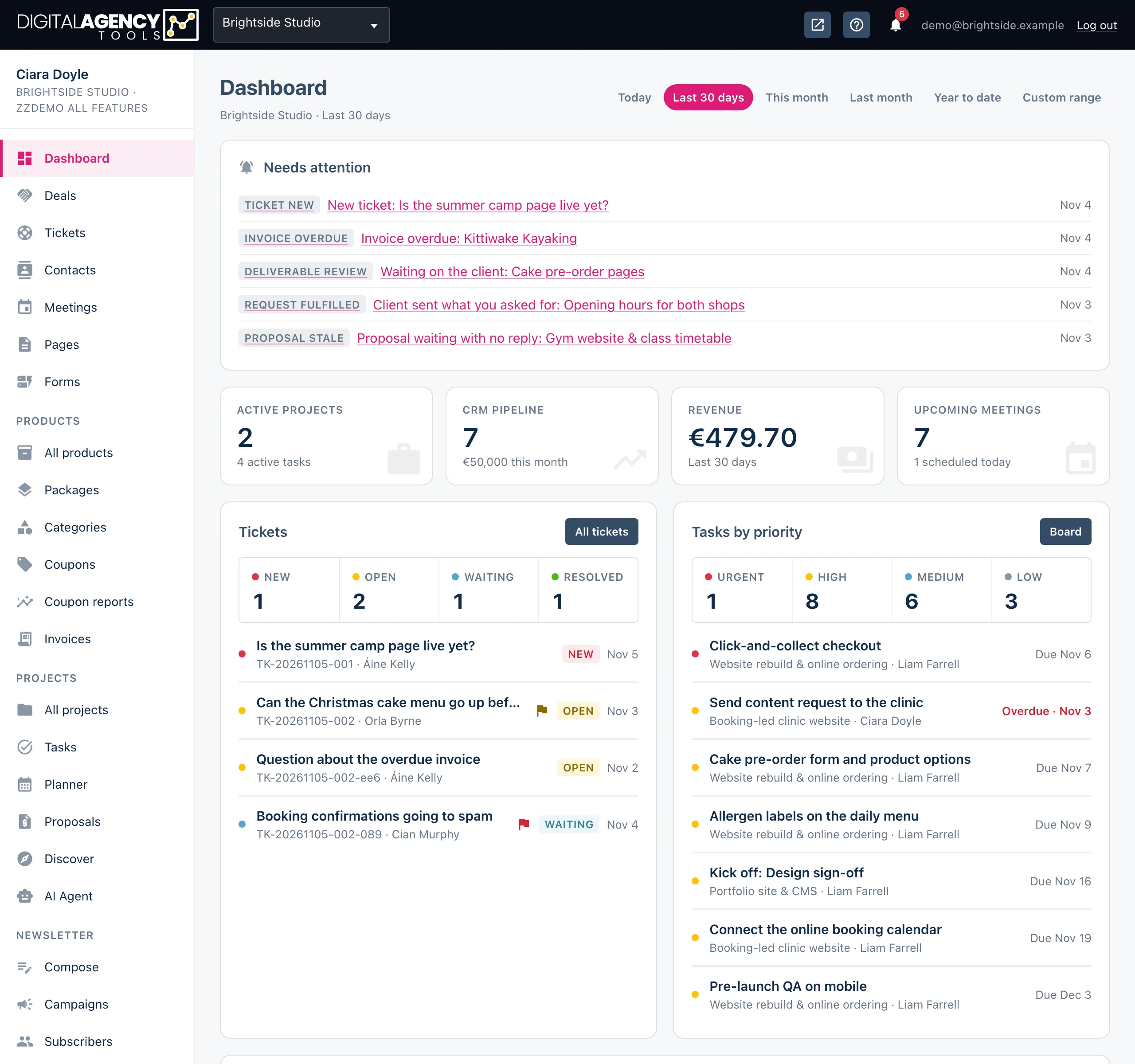
How to change the period
- Open Dashboard in the sidebar.
- Click a period at the top right: Today, Last 30 days (the default), This month, Last month or Year to date.
- For any other dates, click Custom range, pick a start and end date and click the tick to apply.
The chosen period is part of the page address, so you can bookmark it.
The four tiles
| Tile | What it counts |
|---|---|
| Active projects | Projects with the status active. Underneath: how many of their tasks are still to do, in progress or in review. |
| CRM pipeline | Prospects that are not yet won or lost. Underneath: the deal value of those expected to close within the next month (including any whose close date has already passed). |
| Revenue | For the chosen period: confirmed, completed and paid bookings by booking date, plus paid invoices by invoice date. |
| Upcoming meetings | Meetings still to come that are not completed or cancelled. Underneath: how many are today. |
Only the Revenue tile follows the period. The others always show today's position.
Tickets and tasks
The Tickets card counts tickets that are New (not yet answered), Open (being worked on), Waiting (on the client) and Resolved in the last 30 days. Click a count to open the ticket list filtered to it. Below are the six most pressing unresolved tickets.
Tasks by priority counts open tasks as Urgent, High, Medium and Low; a click opens the task board filtered to that priority. Below are the seven most urgent open tasks, soonest due first, with overdue ones marked.
Click through
a ticket count  → Tickets, filtered
a task count    → task board, filtered
All tickets     → Tickets
Board           → Tasks board
View all        → Meetings
Bookings and meetings
Upcoming bookings and Upcoming meetings list the next five of each, with the customer, date and time, and status. Recent bookings lists the last five bookings made. Click an ID or a name to open it, or View all for the full list.
When something needs you — a proposal accepted, a client request fulfilled, an invoice overdue — a Needs attention card appears at the top of the page.
Still stuck?
Can't find what you're looking for? Send us a message and we'll reply by email.