
Approvals
Put a deliverable up for review, and your client can approve it from the portal with their name on it. The same "Needs your attention" list is where they answer your requests.
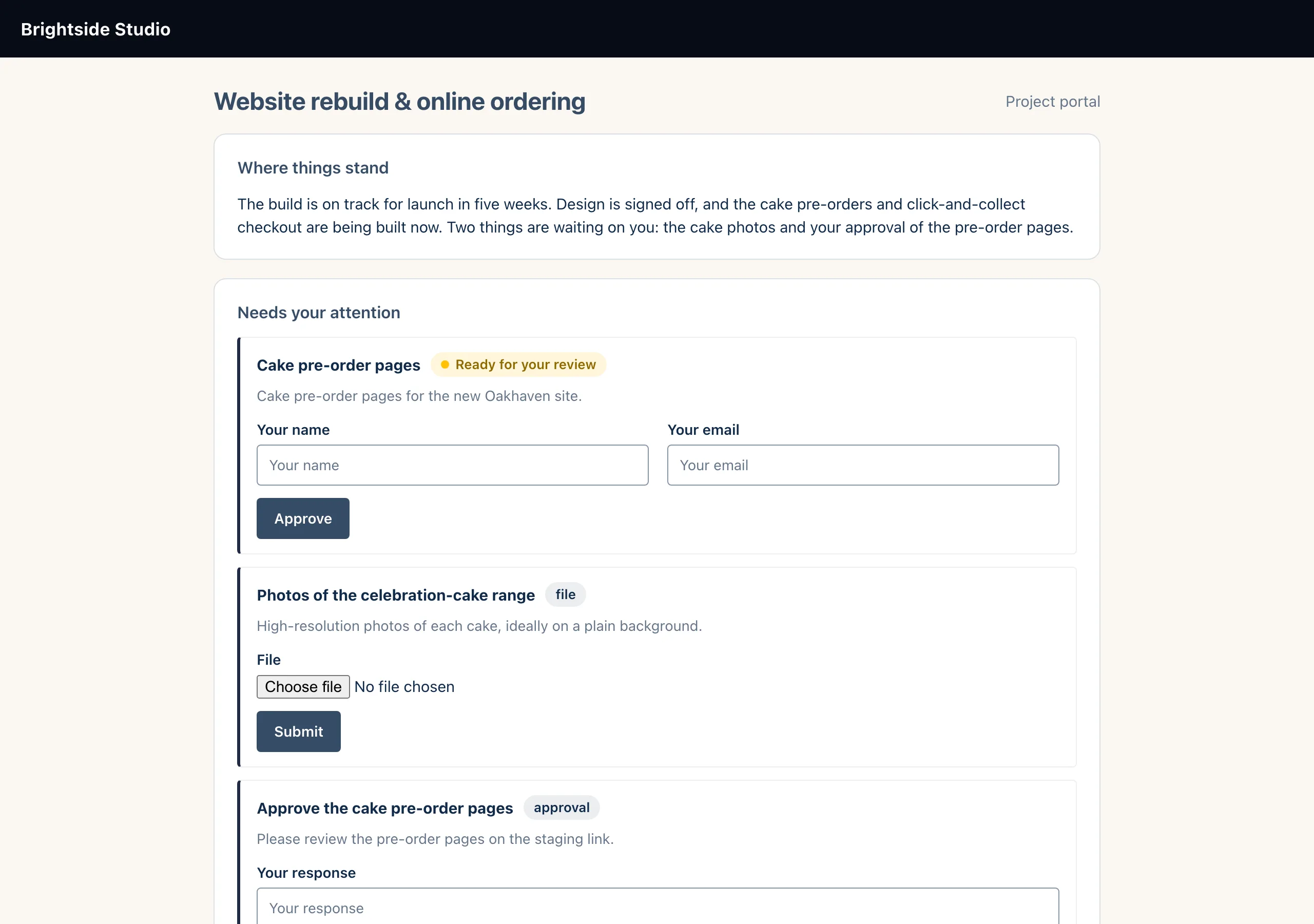
How to ask for an approval
- On the project's Delivery tab, attach the files to the deliverable with the paperclip icon.
- Set the deliverable's status to Ready for review.
- Tell your client it is ready: send them the portal link, or a client update. Changing the status does not email them.
- The client opens the portal, downloads the files, enters Your name (required) and Your email (optional), and clicks Approve.
- You are notified. On the Delivery tab, the deliverable is now Approved, with "Approved by" their name and the date.
What approval records
When the client approves, the deliverable's status becomes Approved and the platform stores the name and email they typed, with the date and time.
You get a "Deliverable approved" notification in the bell and in Needs attention. It also goes by email or WhatsApp to whoever your notification settings name.
In the portal, the deliverable moves out of "Needs your attention" and into the Deliverables list.
Deliverable
in_progress
  → ready_for_review   (you)
  → approved           (client, in portal)
  → delivered          (you)
Changes requested
There is no "reject" button in the portal. If the client wants changes, they will tell you another way. Move the deliverable back to In progress while you work on it, then set it to Ready for review again.
You can also set Approved yourself, for example when a client signs off by email. In that case no approver name is recorded.
Answering requests
Below the deliverables, each open request shows its title and type, and a form that matches the type: a file picker for File, a web address for Link, and a written response for everything else. The client clicks Submit.
The request becomes Fulfilled straight away and you get a "Client request fulfilled" notification. A file upload also raises a "Client uploaded a file" notification.
Good to know
Still stuck?
Can't find what you're looking for? Send us a message and we'll reply by email.